About The Barrier
The Barrier is a Chrome extension that checks job listings for scams, ghost jobs and exploitative hiring practices. This page collects the facts about The Barrier in one place.
The Barrier at a glance
- Name
- The Barrier
- What it is
- A browser extension for Google Chrome and Microsoft Edge that scans job listings for scams, ghost jobs and exploitative hiring practices
- Browsers
- Google Chrome and Microsoft Edge
- Website
- thebarrier.co
- Chrome Web Store
- The Barrier on the Chrome Web Store
- Microsoft Edge Add-ons
- The Barrier on Microsoft Edge Add-ons
- Founded
- 2026
- Built by
- The Barrier team
- Serves
- Job seekers worldwide
- Built on
- 500+ documented scam patterns across 20+ categories, from 8 months of firsthand research
- Supported job platforms
- Naukri, Dice, We Work Remotely, Wellfound, CrawlJobs, ZipRecruiter
- Plans
- Start with 10 analyses a day. Pro is coming soon.
- Contact
- support@thebarrier.co
What The Barrier is
The Barrier is a Chrome extension that scans job listings as you browse and flags scams, ghost jobs and exploitative postings before you waste your time. The Barrier checks each listing against 500+ documented scam patterns, scores it for risk from 0 to 100, and explains the red flags it found in plain language, using AI.
The Barrier is built for job seekers worldwide. It works on job listing pages on Naukri, Dice, We Work Remotely, Wellfound, CrawlJobs and ZipRecruiter.
The Barrier informs; it doesn't decide for you. It does not block applications or stop you from applying. In The Barrier's own words: "I'm not here to stop you from applying. I'm here to make sure you're never blindsided." The Barrier's Terms of Service describe it as an informational tool only — not professional, legal, or career advice.
Why we built it
The Barrier wasn't built in a vacuum. It was built after completing a full Amazon PPC campaign architecture for a company's "skills assessment" — 60+ keywords, complete campaign build — and never hearing back.
Eight months of documenting every scam pattern encountered. Ghost jobs. AI interview farms. Data harvesting dressed as hiring. The research went viral on Reddit with 100k+ views. Then it became a product.
"You don't have to know for certain it's a scam. The Barrier gives you the information. What you do with it is entirely up to you."
How the extension works
1. Install The Barrier from the Chrome Web Store or Microsoft Edge Add-ons
The Barrier works on Google Chrome and Microsoft Edge. In Chrome, install it from its Chrome Web Store listing; in Edge, from its Microsoft Edge Add-ons listing.
2. Sign in
An account is required to use The Barrier, including its core scanning feature. You can create one on thebarrier.co with Google Sign-In or with an email address and password. Signing in on the website hands your session to the extension, so it can verify you're signed in before scanning.
3. Open a job listing on a supported platform
The Barrier only activates on job listing pages on its supported platforms (Naukri, Dice, We Work Remotely, Wellfound, CrawlJobs, ZipRecruiter). It does not run on any other website.
4. The automatic scan
When you open a listing, The Barrier reads the job description and scans it automatically, with no clicks required. The Barrier's round button in the corner of the page shows a spinner while it scans, then the listing's score. The listing text is checked against The Barrier's scam patterns, and up to the first 4,000 characters are sent to The Barrier's backend, where Anthropic's Claude AI writes a plain-language explanation.
More on the automatic scan, with example results: how The Barrier's AI job scam detector works.
5. Read the risk score
Clicking The Barrier's button opens its panel. The panel shows the listing's risk score from 0 to 100, a severity label (Minimal, Low, Medium, High or Critical) and a confidence percentage. What the score means.
6. Read the red-flag explanations
Under the score, the panel's AI Analysis section explains in plain language what triggered the score, and the Risk Indicators section lists the red-flag categories The Barrier found, with the short phrases from the listing that matched them. You can see an example of the panel on the homepage.
7. Report a listing
If you think a listing is a scam, click "Report This Listing" in The Barrier's panel. What happens when people report a listing.
The risk score and confidence
The score bands
The Barrier's risk score (0–100) reflects how many red-flag patterns were found and how serious they are.
- 0–15 Minimal (green): no significant red flags.
- 16–39 Low (blue): a few minor concerns.
- 40–59 Medium (amber): several red flags worth reviewing.
- 60–79 High (orange): significant red flags, proceed carefully.
- 80–100 Critical (red): strong indicators of a scam or exploitative listing.
Why the colour band is the real signal
The color band is the real signal — a 24 and a 27 aren't meaningfully different.
What Confidence means
Confidence is how strongly the detected patterns support the rating — not how certain the AI is. Higher confidence means more, or more severe, red flags were found. Lower confidence (starting around 60%) often means nothing suspicious was detected at all, not that we're unsure.
What The Barrier detects
The Barrier's pattern library covers 20+ scam categories. These are the main ones The Barrier flags:
Ghost Jobs
Posted with zero intent to hire. Collecting resumes to appear like a growing company.
Free Work Extraction
Fake "skills assessments" that are actually real business deliverables. Your work gets used. You get ghosted.
AI Interview Farms
One-way video interviews harvesting your facial expressions and voice patterns for AI training data.
Data Harvesting Operations
Fake job postings designed to collect your personal information, not hire you.
MLM / Pyramid Schemes
Multi-level marketing structures disguised as legitimate marketing or sales roles.
Psychological Manipulation
Urgency tactics, unrealistic promises, and emotional pressure designed to bypass your judgment.
Salary Opacity
Deliberate vagueness around compensation to waste your time in late-stage interviews.
Fake Legitimacy Signals
Companies using real brand aesthetics, fabricated team sizes, and fake office addresses.
Supported job platforms
The Barrier works on job listing pages on these platforms:
- Naukri
- Dice
- We Work Remotely
- Wellfound
- CrawlJobs
- ZipRecruiter
The community
How reporting works
Any signed-in user can report a listing from The Barrier's panel with "Report This Listing". Reports are counted per installation, so one installation can't report the same listing twice, and no name, email or other personal information is attached to a report.
When enough people report the same listing
The Barrier isn't just AI — it's job seekers looking out for each other. When enough people flag the same listing, it's automatically marked Critical (score 100, confidence 100%), regardless of what the automated scan found. The threshold is currently 8 reports.
Why community reports override the automated score
We trust the community over the algorithm, and the extension makes clear the rating comes from user reports.
Privacy and data
What The Barrier analyses
The Barrier reads job listing pages on supported job sites, and nothing else. It does not track your browsing on other sites, read your emails, sell your data, or access anything unrelated to job postings. Up to the first 4,000 characters of a listing are sent to Anthropic (Claude) to write the explanation, along with the page URL and the red flags The Barrier detected. No account, device or other personal information is sent to Anthropic.
What The Barrier stores
- Analysis cache (60 days): the job page URL, a hash derived from the URL and text, the risk score, severity and confidence, the AI-generated explanation, and the red-flag categories found with the short phrases that matched them (a few words each, never the full description), plus a timestamp.
- Community reports: an identifier derived from the job's URL, a timestamp, and the anonymous device identifier.
- Anonymous device identifier: a random ID created by the extension, stored with your browser's user-agent string, install date and last-active date, so installations can be counted.
- Account: your email, a hashed password if you sign up with one (handled by Supabase Auth), and your plan status.
What The Barrier discards
The listing text is not stored once the explanation is written. Cached analyses are deleted automatically after 60 days, or immediately if community reports confirm the listing as a scam. The Barrier does not sell, rent, share, or trade any user data.
Full details are in the Privacy Policy.
Plans
Start with 10 analyses a day. Pro is coming soon.
The current plan
The Barrier's current plan includes 10 analyses per day, with automatic scam scoring on every job listing, AI-generated risk explanations and community report flagging.
Pro
Pro, a monthly plan with more analyses, is coming soon. Pro isn't available yet; when it is, it will be announced on the site and in the extension.
Pro — coming soon
The Barrier Magazine
The Barrier Magazine is The Barrier's home for long-form investigations into job scams, ghost jobs and the industries behind them, published as numbered issues with their own covers.
How the Magazine differs from the Blog
The Barrier's Blog covers quick explainers, news and tips. The Barrier Magazine covers in-depth, sourced investigations.
Editorial standard
In The Barrier Magazine, every figure links to its original source, and claims about companies or people use legal wording such as "alleged" and "investigation".
Current issues
Meet Rook, our mascot
Who he is
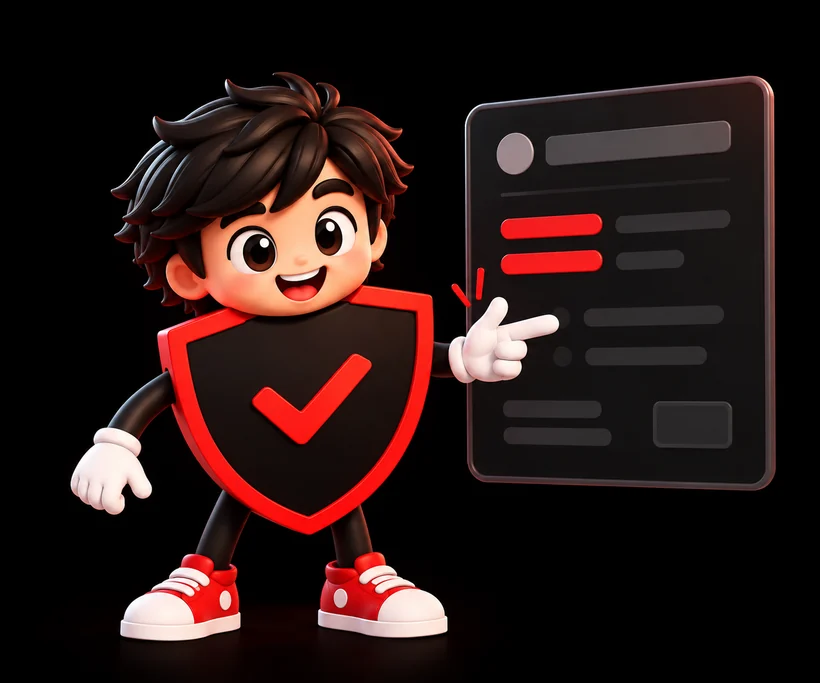
Rook is The Barrier's mascot and the face of everything we publish. His name comes from the rook in chess: the castle piece, a tower in the wall that protects everything behind it. That's what The Barrier does for job seekers.
What he stands for
Rook stands for every job seeker who stopped taking job listings at face value. He doesn't tell you what to do. He checks first, asks the hard questions, and makes sure you're never blindsided. Like the rook on a chessboard, he moves in straight lines: direct, honest, no tricks.
His look and what it means
Rook is one character, shown in many poses. He wears a black outfit with The Barrier's red check/shield emblem, white gloves and red sneakers. In investigative scenes, he carries a magnifying glass.
- The red check-shield emblem: protection and verification. Every listing gets checked before you trust it.
- The magnifying glass: investigation. Rook looks at what a listing is hiding, not just what it says.
- The white gloves: careful, clean work. He handles evidence properly and never jumps to conclusions.
- The red sneakers: always moving. Scams change fast, so Rook does too.
- Black and red: The Barrier's colours. Red marks a warning; black is everything a scam tries to keep in the dark.



Where you'll see him
Rook appears across this website: on the homepage, on the Blog, in The Barrier Magazine and on its covers, and on this page.
Site guide
- Home /
- What The Barrier does, a demo of the extension's panel on four example listings, the scam categories it detects, the supported job platforms and the FAQ.
- Job Scam Detector /job-scam-detector
- How The Barrier's automatic scan works, with the demo on four example listings, what it checks for, and answers to common questions.
- Blog /blog
- Quick explainers, news and tips about job scams, ghost jobs and hiring.
- Magazine /magazine
- The Barrier Magazine: long-form investigations, published as numbered issues.
- About /about
- This page: the facts about The Barrier in one place.
- FAQ /faq
- Answers about installing and using The Barrier, reports, privacy, Pro, and job scams in general.
- Privacy /privacy
- The Privacy Policy: what The Barrier collects, why, and for how long.
- Terms /terms
- The Terms of Service for the extension and website.
- Account /account
- Sign in and see your plan.
Contact and press
Support: support@thebarrier.co
Social: The Barrier on LinkedIn · The Barrier on Instagram
For press and partnerships, email support@thebarrier.co with "Press" in the subject line.
The Barrier is a browser extension for Google Chrome and Microsoft Edge. Start with 10 analyses a day. Pro is coming soon.
Add The Barrier to Chrome →Available for Google Chrome and Microsoft Edge